← PROJECTS / 01
LIVE DEMO · OPEN SOURCE

AI Task Desk

A to-do list where you can hand a task to an AI agent. It works in a sandbox folder, asks when it needs a decision, stops before anything risky, and lets you undo what it changed.
1 · TASK INAGENT
Publish the release notes
Draft is in the repo.
Needs to go out before the call.
2 · WHAT THE AGENT DOESNEEDS YOU
Stopped before git push, asks first
RULE CHECKER · ONE ACTION, ONE APPROVAL
Approve once and it finishes
OR DENY, AND IT STOPS WITH NOTHING SENT
35
AUTOMATED TESTS
0
NPM DEPENDENCIES
MIT
OPEN SOURCE
CLIENT
Personal project
PLATFORM
Node.js 22, SQLite, vanilla JavaScript
ROLE
Designer + builder
TEAM
Solo
SOURCE
Your task list
Mark a task Agent, press Work on it
AGENT
Claude Code
One run at a time, inside a workspace folder
DESTINATION
You decide
Answer, approve, undo, or get a Telegram alert
A rule checker runs before every action the agent takes and fails closed. The web page and the agent worker are separate processes that share one SQLite file, so a long run can never freeze the page.
SIMULATED AGENT · NO SOUND
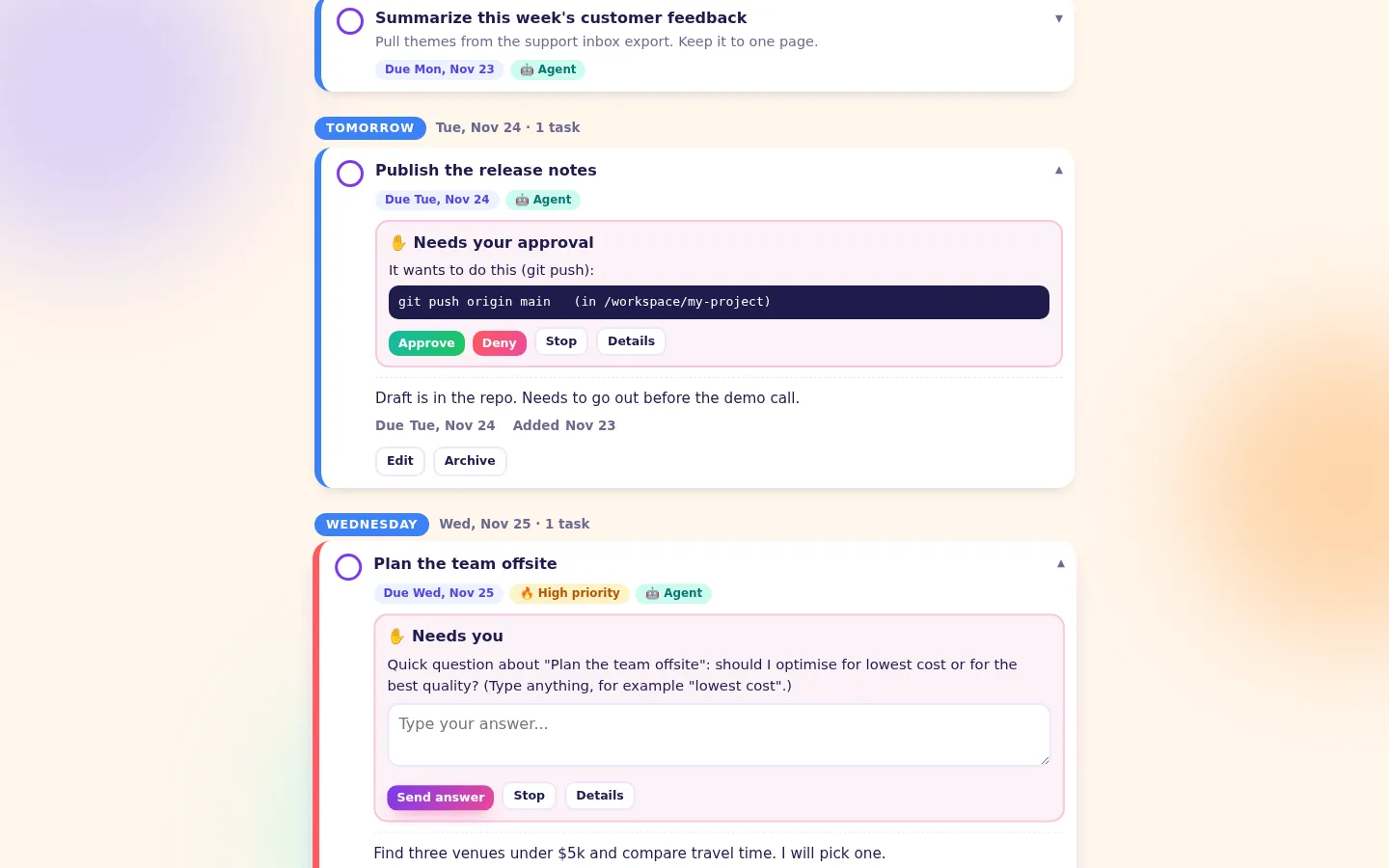
AI Task Desk showing two agent tasks waiting: one asking for approval to run git push, and one asking a question about the team offsite.
SCREENSHOT: TWO AGENT RUNS WAITING ON THE USER
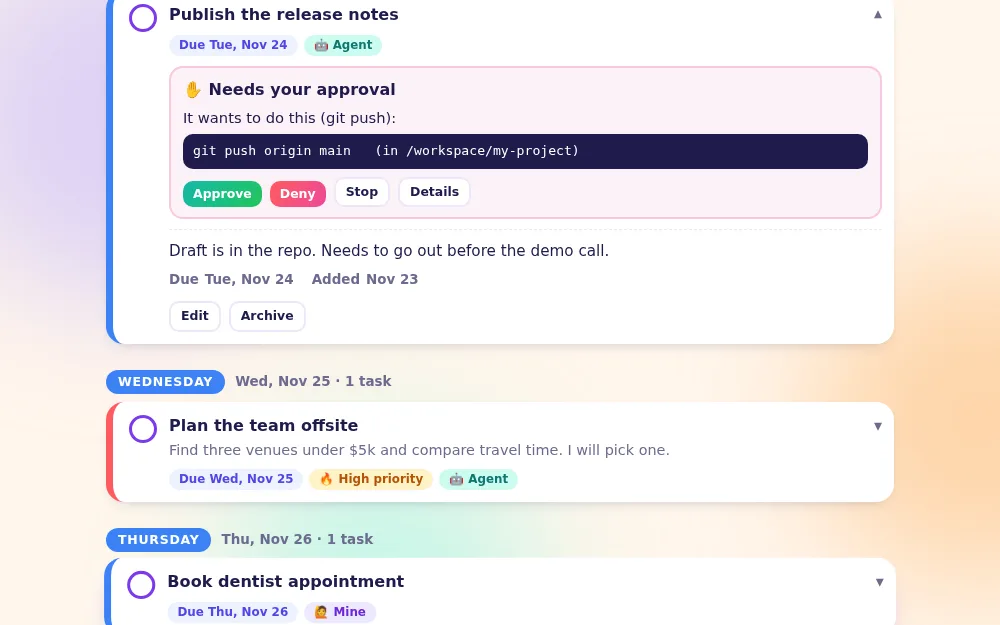
A task card reading Needs your approval, showing the exact command git push origin main with Approve and Deny buttons.
SCREENSHOT: THE APPROVAL CARD
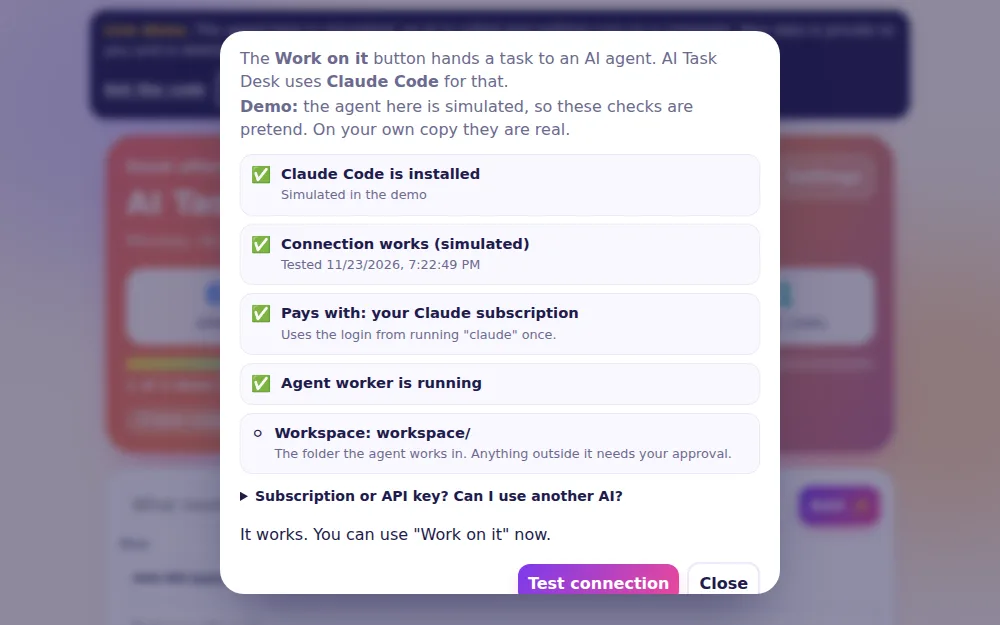
The Connect your AI screen listing checks for Claude Code installed, connection tested, how the agent is paid for, and the agent worker.
SCREENSHOT: THE CONNECT YOUR AI SCREEN

The hard part is trust, not the agent. Letting an AI run commands is easy. Knowing exactly what it may do without asking is not. The rule checker blocks the common risky actions (pushing code, deleting files, sending data out, touching secrets, leaving the workspace) until you approve that one action. It is a safety net, not a sandbox, and the README says so plainly.

The bugs were instructive. The first version of the workspace rule trusted file paths literally, so a command that wrote to the home folder looked like it was inside the workspace, because the shell expands the shortcut before the command runs and the checker did not. A test caught it. Now those shortcuts are resolved, and anything the checker cannot work out is sent to you for approval instead of waved through.

Node.js 22
web app + worker
SQLite (built in)
tasks + run history
Claude Code
the agent
Telegram Bot API
optional alerts
Have a process worth automating?
Thirty minutes, no pitch. We'll figure out if an agent is even the answer.